

Mount the clamp on the most stable part of the desk, keep the light at the manufacturer’s tested treatment distance, and make sure the cord still has slack when the desk moves. A safe setup should feel solid at every desk height and keep the beam out of your eyes unless the device is specifically designed for facial use.
Does your neck tighten up by midafternoon while your desk keeps collecting gadgets that never quite fit? A clamp-mounted light can help, but only if it stays put, holds the right angle, and is easy enough to use consistently. This article explains how to mount it, position it, and decide when a desk clamp makes sense and when it does not.
Why a clamp-style setup can work
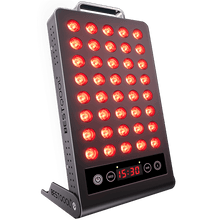
A clamp-style red light therapy device is a light panel or targeted lamp that attaches to furniture with a tightening bracket instead of sitting on a floor stand or hanging on a wall. That approach can be practical because home red light therapy works best when it fits your real routine, and device format should match your goal. In everyday use, the biggest advantage of a desk clamp is that it keeps a small panel or targeted lamp at a repeatable height and angle without taking up floor space.
The tradeoff is that a standing desk moves. That means your mount has to do more than hold for now. It has to stay stable during height changes, avoid pulling on the power cord, and keep the treatment distance consistent enough that your dose does not drift from one session to the next. That matters because red light therapy follows a biphasic dose response, meaning too little may do very little and too much is not automatically better.
What to confirm before you attach anything
The first check is whether your device is even a good fit for clamp mounting. Smaller targeted panels and compact lamps make more sense at a desk than large full-body units, because bigger panels are better suited to dedicated stands, wall mounts, or room layouts designed for broader coverage. If your actual goal is full-back, full-leg, or systemic exposure, a desk clamp usually becomes an awkward compromise.
The next check is whether the device is transparent about its specs. For home use, the safer choice is an LED device with clearly stated wavelengths and irradiance, not vague claims like “high power.” For skin-focused use, red wavelengths around 630 to 660 nm are the most commonly targeted range, while near-infrared around 800 to 1,000 nm is commonly used for deeper tissues such as muscle and joints. If the seller does not tell you what the device emits or at what tested distance it performs, that becomes a mounting problem too, because you cannot place it intelligently.
Room and desk placement matter more than most buyers expect. A workable setup needs nearby power, enough clearance to maintain the recommended treatment distance, a stable surface, and enough ventilation so heat does not build up around the unit. In practice, that means the clamp should not be competing with a monitor arm, a laptop riser, and a tangle of chargers on the same narrow corner of the desk.
How to clamp it to a standing desk without creating new problems

Choose the right edge of the desk
The safest place to attach a clamp is the straightest, most rigid part of the desktop. The same principle used for fixed mounts applies here: secure mounting matters because unstable placement can reduce effectiveness and create discomfort or safety issues. On a standing desk, that usually means avoiding rounded corners, soft edge trim, cable cutouts, and any area close to a moving joint or frame seam.
A simple real-world test helps. Lower the desk to a comfortable working height before attaching the clamp, then tighten it on the rear or side edge where the desktop feels least flexible when you press down with your hand. If the edge visibly flexes, the clamp is already in the wrong place.
Tighten for stability, then test the desk through its full travel
After tightening the clamp, do not assume it is safe just because it feels fine when the desk is still. Raise the desk to standing height, then lower it again, watching whether the lamp head droops, whether the clamp twists, and whether the cord catches on anything. The goal is not just a secure mount, but a setup you can repeat without re-aiming every time the desk moves.
Power access should stay simple and low risk. Home setup guidance consistently favors a nearby outlet and avoiding extension cords when possible because they add clutter and tripping risk. For a standing desk, it also helps to leave enough cable slack for the full height range without letting the cord hang where your knees, chair arms, or footrest can snag it.
Set the angle and distance before your first session
Once the clamp is secure, adjust the beam so it lands squarely on the treatment area instead of washing across half the desk. Red light therapy is not just about owning the device; placement and distance affect the delivered dose, and common home-use ranges are roughly 6 to 24 inches depending on the device and treatment goal. For many compact at-home panels, people do best when they stay within the manufacturer’s tested range rather than improvising from across the room.
For a desk example, if you want a short neck-and-shoulder session after computer work, clamp the light slightly behind and to the side of your monitor rather than directly in front of your face. That makes it easier to aim at the upper trapezius or side of the neck while keeping glare out of your eyes. If your use is facial, place the unit so you can sit upright and face it without craning forward, then use eye protection for home LED use when the beam is directed toward the face.
What safe desk use looks like in practice
A clamp setup works best as a short, intentional session, not as a desk lamp you leave running all day. General home protocols commonly fall in the 5- to 20-minute range per treatment area, with consistent use several times per week being more important than adding extra time. If you are new to it, start on the shorter side and make sure the mount stays stable for several sessions before treating that arrangement as permanent.
Bare skin helps make sessions more predictable. Clothing, heavy products, and physical barriers can reduce how much light actually reaches the target area, so a clamp setup is most useful when you can expose the area you mean to treat rather than hoping the beam works through a shirt collar or sleeve. At a desk, that often means the neck, forearms, wrists, or a brief facial session, not a lower-back treatment through office clothes.
When a desk clamp is the wrong mounting choice
If your device is large, heavy, or meant for broader body coverage, a desk clamp is usually a workaround, not a solution. Stand systems and wall mounts exist for a reason: they handle bigger panels more securely and make full-body positioning easier. A clamp works best when the job is targeted exposure in a small space.
That is also true if your main goal is comfort. A reclined or standing treatment position is often easier to hold consistently than trying to line up a larger beam while answering emails. Dedicated room setup guidance tends to favor a repeatable environment that supports actual adherence rather than a clever attachment point. If the desk mount makes treatment feel fussy, the stand you skipped at first may be the better choice.
A simple way to judge your setup after one week
The safest clamp setup passes three tests. First, the device stays fixed when the desk moves from sitting to standing height. Second, you can reproduce the same distance and angle without guessing. Third, you finish a session without eye strain, heat buildup, or the feeling that the clamp might slip if you bump the desk.
If even one of those tests fails, adjust the mount or change the mounting method. Red light therapy tends to reward consistency and sensible dosing, not improvised hardware.
A good desk-mounted setup should disappear into your routine: stable, repeatable, and easy to trust. If the clamp makes the light harder to position than a tabletop stand or small wall mount would, that is your signal to choose the safer tool instead of forcing the desk to do every job.


 Small
Small

 Moderate

 Moderate

 Moderate

 Full
Full

